VisibilitySwitch
The VisibilitySwitch component enables GameObjects to receive events about visibility state changes in the fog of war system. The object is considered visible when at least one of its checkpoint positions is within range of any VisionSource with a matching layer. Checkpoint positions are offsets relative to the GameObject's position and rotation.
Rotation Behavior
The rotation behavior depends on the Orientation setting in the FogOfWarManager:
- XZ orientation (top-down games): Uses the GameObject's Y-axis rotation
- XY orientation (2D side-scrolling games): Uses the GameObject's Z-axis rotation
Usage
-
Add the
VisibilitySwitchcomponent to any GameObject that should receive events about fog visibility changes. -
Configure the component properties in the Inspector.
Inspector Properties
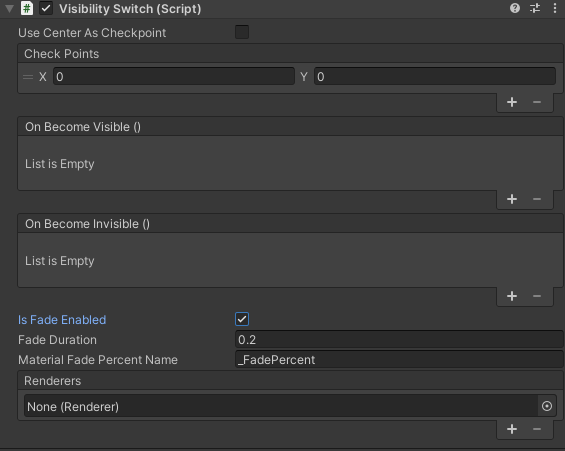
-
Layer (flags): Defines on which layers the object is visible. See Vision Layers.
-
Use Center As Checkpoint: When enabled, uses only the GameObject's center position
(0, 0)as a single checkpoint. When disabled, allows you to define custom checkpoint positions in the Check Points list. -
Check Points: (This property appears only if "Use Center As Checkpoint" is unchecked) A list of Vector2 positions relative to the GameObject's position and rotation. The object is considered visible if any checkpoint position is within range of a VisionSource with matching layers. At least one checkpoint is required.
-
On Become Visible: A UnityEvent triggered when the object transitions from hidden to visible state.
-
On Become Invisible: A UnityEvent triggered when the object transitions from visible to hidden state.
Public API
-
bool IsVisible- Returnstrueif the object is currently visible,falseif hidden (read-only). -
VisionLayer Layer- Gets or sets the vision layer flags. -
event Action<bool> OnVisibilityChanged- A C# event triggered when visibility state changes. The boolean parameter istruewhen becoming visible,falsewhen becoming hidden.