MapFogOverlayUI
The MapFogOverlayUI component applies fog of war overlay to a UI image, allowing you to add the fog effect to your custom map.
Required Component
The MapFogOverlayUI component requires either an Image or RawImage component on the same GameObject.
Usage
-
Create a GameObject under your Canvas.
-
Add an
ImageorRawImagecomponent to the GameObject and assign your map texture. -
Add the
MapFogOverlayUIcomponent to the same GameObject. -
Configure the fog properties in the Inspector.
Inspector Properties
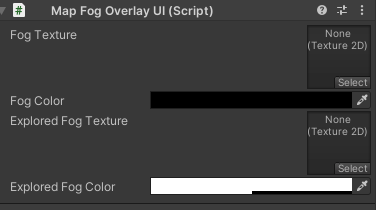
-
Unexplored Fog Texture: Texture for unexplored (hidden) areas on the minimap.
-
Unexplored Fog Color: RGB color tint for the fog texture in unexplored areas.
-
Explored Fog Texture: Texture for explored but not currently visible areas on the minimap.
-
Explored Fog Color: RGBA color tint for the explored fog texture. Alpha controls the opacity level.