Fader
The Fader component provides smooth fade-in and fade-out transitions for renderers based on fog of war visibility changes.
Custom Shader Required
The Fader requires a custom shader with a float property (default: _FadePercent) that controls transparency. The shader must use this property to fade the material's alpha channel. Sample shaders demonstrating this functionality are available in the Samples section of the package.
Required Component
The Fader component requires a VisibilitySwitch component on the same GameObject. It will automatically retrieve the visibility state from the attached VisibilitySwitch.
Automatic Renderer Management
At the end of fade out, all renderers in the list are automatically disabled by the Fader component. You do not need to manually disable renderers in your VisibilitySwitch event handlers (On Become Invisible). The Fader handles this automatically.
Usage
-
Ensure your GameObject has a
VisibilitySwitchcomponent attached. -
Add the
Fadercomponent to the same GameObject. -
Configure the fade properties in the Inspector.
Inspector Properties
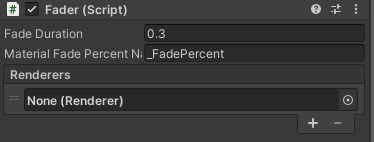
-
Fade Duration (min 0): The duration in seconds for fade in/out transitions.
-
Material Fade Percent Name: The name of the material shader property used to control the fade effect. Default is
_FadePercent. This property should be a float value between 0 (fully transparent/hidden) and 1 (fully visible) in your shader. -
Renderers: An array of Renderer components to which the fade effect will be applied.